
You can nurture your child’s coding interest without writing a single line of code yourself. The key is creating an environment where curiosity thrives, providing the right resources at the right time, and connecting your child with a community that celebrates their progress. What matters most isn’t your technical expertise but your willingness to support their journey, ask questions alongside them, and help them find answers when they get stuck.
If you’ve ever felt intimidated when your child asks about Python or JavaScript, you’re not alone. Most parents didn’t grow up with coding as part of their education, and that’s perfectly fine. Your role isn’t to become a programmer overnight. Instead, think of yourself as a guide who helps your child discover tools, build confidence, and develop problem-solving skills that extend far beyond the screen.
The beauty of supporting a young coder today is that the landscape has transformed. Free platforms, visual programming languages designed for beginners, and vibrant online communities mean your child can learn at their own pace with resources tailored to their age and interests. Your job is to recognize the spark, remove barriers to exploration, and celebrate the creative projects they build, whether that’s a simple animation, a game, or something that solves a real problem they’ve noticed in their world.
This guide walks you through practical steps to champion your child’s coding journey with confidence and intention.
What You’ll Need to Get Started
You don’t need a computer science degree or a fancy home office to support your child’s coding interest. What you do need is surprisingly simple: a few basic tools, some dedicated time, and the right mindset.
Here’s what to gather before you begin:
- A working computer, laptop, or tablet with at least 4GB of RAM and a current operating system
- Reliable internet connection with enough bandwidth for video tutorials and interactive platforms
- Access to age-appropriate coding platforms like Scratch, or structured courses designed for kids
- A commitment of 30-60 minutes several times per week to learn alongside your child
- Patience and curiosity, willingness to explore and problem-solve together
The device doesn’t need to be cutting-edge. Most coding platforms for beginners run smoothly on standard laptops or tablets that families already own. If your child will be taking online courses, headphones can help them focus during instructor-led sessions without disrupting the household.
Beyond the physical setup, your most valuable resource is time spent together. Plan to be present during those early sessions, not to teach or direct, but to share the experience. Your child needs to see that you’re genuinely interested in what they’re creating, even if you don’t understand every technical detail.
Remember, your role isn’t expert, it’s champion. You’re there to ask questions, celebrate breakthroughs, and help them push through frustrating moments. That supportive presence matters far more than any coding knowledge you might lack. The platforms and instructors will handle the technical teaching. You’re building the encouragement and enthusiasm that keeps your child coming back.
Important Considerations Before You Begin

Before you dive in, a few mindful practices will help you support your child’s coding interest without unintended pitfalls. First, be conscious of screen time, coding adds to your child’s daily device use, so factor it into screen time limits by age and balance it with physical activity and offline hobbies. When exploring coding platforms together, prioritize keeping children safe online: choose reputable sites with age-appropriate content, review privacy settings, and supervise early sessions until you’re confident they understand safe online behavior.
Learn to distinguish healthy challenge from genuine frustration. It’s normal for your child to furrow their brow or try several approaches to solve a coding problem, that’s productive struggle. But if they consistently shut down, refuse to engage, or show signs of distress, it’s time to step back and reassess.
The most sustainable coding journeys are driven by genuine interest, not parental ambition. Your role is to create the conditions for exploration, not to manufacture a future software engineer. If your child’s interest wanes temporarily, that’s okay. Forcing continued engagement when the spark has dimmed often backfires, turning what could be a lifelong skill into a source of resentment.
Step-by-Step: How to Support Your Child’s Coding Interest
Step 1: Start with Conversation, Not Curriculum
Before researching platforms or enrolling in courses, sit down with your child and simply ask what draws them to coding. Are they fascinated by how video games work? Do they want to build their own website? Maybe they’ve seen a robot move and wonder if they could program one. The specific spark matters more than you might think.
Listen without steering the conversation toward what you think they should learn. If they mention wanting to create animations of their favorite characters, that’s your starting point, not a generic “learn to code” curriculum. Their answers reveal both their interest and their learning style. A child excited about games thinks differently than one captivated by building apps.
Take notes during this conversation. When they say “I want to make a game where you can fly,” write it down. These details become your roadmap for choosing resources and supporting their journey. You’re not looking for a polished career plan from a ten-year-old, you’re identifying the thread of curiosity you’ll help them follow. This conversation shifts you from director to guide, and that distinction makes all the difference.
Step 2: Explore Age-Appropriate Resources Together
Once you know what sparks your child’s interest, it’s time to find the right platform or program. Don’t just sign them up and walk away, explore together. Set aside an hour to try a few options side-by-side. Look for platforms that match their age: younger kids (6-10) thrive with visual, drag-and-drop tools like Scratch or, while older kids (11-16) might be ready for text-based languages like Python or JavaScript through platforms like Codecademy or Khan Academy.
Pay attention to how the interface feels. Is it intuitive? Does it offer clear instructions without being patronizing? Most importantly, does your child seem engaged or overwhelmed? You’ll know within minutes if something clicks.
For families wanting structured, expert-led instruction, consider professionally taught courses designed specifically for kids. ESDNL offers interactive coding classes with real instructors who guide students through projects at their own pace, combining the benefits of community learning with personalized support. This kind of environment can be especially helpful if your child responds well to mentorship or if you want reassurance that they’re building solid foundational skills.
The goal isn’t to find the “perfect” resource immediately, it’s to start somewhere and adjust as you learn what works.
Step 3: Create a Dedicated Learning Space and Routine
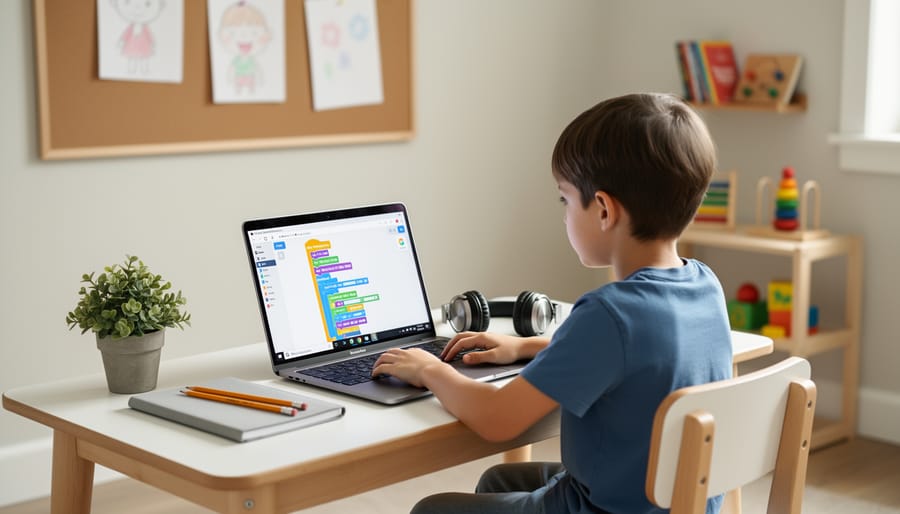
A physical space matters more than you might think. Designate a spot where your child can leave projects open, return to half-finished code, and see their progress at a glance. It doesn’t need to be elaborate, a corner of the dining table works if it’s consistently theirs during coding time. Good lighting, a comfortable chair, and minimal background noise help them focus without fighting distractions.
Equally important is rhythm without rigidity. Notice when your child has the most mental energy, some kids code best right after school, others thrive on weekend mornings. Block out two or three sessions per week at those optimal times, but stay flexible. If soccer practice runs late or they’re genuinely exhausted, skip it. Forced sessions breed resentment. The goal is making coding a natural part of their week, something they anticipate rather than endure. Consistency builds skills; pressure kills curiosity.
Step 4: Celebrate Small Wins and Normalize Mistakes
Every coding breakthrough deserves recognition, whether your child figures out a tricky loop, fixes their first bug, or simply sticks with a frustrating problem for ten minutes. Point out these moments: “You kept trying different solutions until one worked, that’s exactly what programmers do.” Specific praise matters more than generic encouragement.
When errors pop up (and they will), resist the urge to fix things immediately. Instead, normalize the struggle: “Even professional developers spend half their day debugging. It’s not a sign you’re doing it wrong, it’s just how coding works.” Share stories of famous tech failures that led to breakthroughs. Your calm reaction to their frustration teaches resilience.
Keep a simple wins journal together, a photo of their screen, a note about what they built, or a quick sketch of their idea. Revisiting these when motivation dips reminds them how far they’ve come. The goal isn’t perfection; it’s progress and persistence.
Step 5: Connect Them with a Community

Coding doesn’t have to be a solitary activity. Connecting your child with other young coders transforms learning from an isolated hobby into a shared adventure. Look for local coding clubs, library programs, or school-based coding groups where they can collaborate on projects and troubleshoot together. Online communities designed for kids, moderated forums or platform-specific groups, offer safe spaces to share creations and ask questions.
ESDNL’s after-school programs and community coding initiatives create exactly this kind of supportive environment, pairing kids with instructors and peers who speak their language. Tech extracurriculars like these help children see that debugging frustrations and breakthrough moments are universal experiences, not personal failures.
Community connection also opens doors to mentorship. Older students, professional developers volunteering their time, or even other parents can offer fresh perspectives and encouragement. When your child realizes they’re part of something bigger than their bedroom workstation, motivation tends to stick around long after the initial excitement fades. The right community turns “I’m stuck” into “Let’s figure this out together.”
Step 6: Encourage Real-World Application and Creativity
The real magic happens when coding stops being abstract and starts solving actual problems or creating something your child cares about. Encourage them to build a choose-your-own-adventure game for their younger sibling, design a website showcasing their art portfolio, or animate a scene from their favorite book. Ask, “What would make your life easier?” or “What could you create that would make someone smile?” These questions shift coding from practice exercises to purposeful invention.
Look for opportunities that connect coding to their world. Maybe they can design a digital invitation for a birthday party, build a quiz app about their pet’s care routine, or create an interactive story about a cause they believe in. Some kids light up when they discover coding for charity projects, using their skills to help organizations they care about. Others thrive when combining coding with experiences like tech field trips that show how professionals use programming daily.
When projects have personal meaning, your child will push through frustration, experiment fearlessly, and take genuine pride in the result.
How to Know It’s Working (and What to Do Next)
You’ll know your support is working when coding stops feeling like a chore and becomes something your child chooses. Watch for signs like them voluntarily returning to a project after initial frustration, excitedly explaining what they built to anyone who’ll listen, or independently troubleshooting errors before asking for help. These behaviors signal that coding has shifted from an activity you encouraged to something they genuinely own.
Another reliable indicator is their willingness to tackle harder challenges. If your child moves from visual block coding to text-based languages, or asks to join more advanced projects, they’re ready to level up. Pride matters too, kids who feel genuinely supported will want to share their work, whether that’s showing you a game they coded or posting a project in an online community.
Once you see these signs, it’s time to expand opportunities. Help them explore specialized topics that match their interests: game design, web development, robotics, or data science. Look into coding competitions appropriate for their age and skill level, these provide goals without overwhelming pressure. Connecting with community mentors through clubs or programs can introduce new perspectives and techniques your child wouldn’t encounter alone.
For highly motivated kids, contributing to beginner-friendly open-source projects or creating tutorials for younger learners deepens understanding while building real-world skills. Remember, you’re cultivating a mindset of exploration and problem-solving that extends far beyond coding itself. Progress isn’t linear, and that’s perfectly fine.
Common Questions Parents Ask
What if I don’t know how to code myself?
You don’t need coding expertise to be an effective supporter. Your role is to encourage curiosity, help find quality resources, celebrate progress, and problem-solve together when challenges arise, skills you already have as a parent.
How much time should my child spend coding?
Start with 30-60 minutes a few times per week and let your child’s interest guide frequency. Quality matters more than quantity, engaged, focused sessions beat forcing daily marathons that lead to burnout.
What if my child loses interest after a few weeks?
Interest fluctuations are completely normal, especially for kids exploring multiple hobbies. Keep the door open without pressure, they might return with fresh enthusiasm later, or they’ve simply learned that coding isn’t their passion right now, which is valuable self-knowledge.
Is there an ideal age to start learning to code?
Children as young as six can grasp basic coding concepts through visual, game-based platforms, while teens can dive into text-based languages. The best age is whenever genuine interest appears, early exposure builds comfort with technology, but starting at twelve or fourteen works just as well for motivated learners.
How do I balance coding with sports, music, and other activities?
Treat coding like any other enrichment activity. Build it into your family’s weekly rhythm without displacing established commitments, and stay flexible, some weeks coding takes priority, other weeks it steps back for a tournament or recital.
Remember that these questions reflect the uncertainty most parents feel when entering unfamiliar territory with their kids. Your willingness to seek answers demonstrates exactly the kind of engaged, growth-oriented mindset that helps children thrive. Trust your instincts about what works for your family’s schedule and your child’s temperament, and don’t hesitate to adjust your approach as you learn what resonates.
You don’t need to be a programmer to raise one. The most powerful tool you bring to your child’s coding journey isn’t technical knowledge, it’s your belief in their potential and your willingness to walk alongside them as they explore. Every developer, engineer, and creator started as a curious beginner, fumbling through their first lines of code with someone who believed they could figure it out.
Your role isn’t to have all the answers. It’s to ask the right questions, celebrate the messy process of learning, and create space where mistakes become discoveries rather than discouragements. When you sit beside your child as they troubleshoot a stubborn bug, or listen as they excitedly explain how their animation works, you’re doing something profound: you’re showing them that their interests matter and their ideas are worth pursuing.
The future your child will help build doesn’t exist yet. By supporting their coding journey today, with patience, curiosity, and encouragement, you’re giving them more than technical skills. You’re nurturing the confidence to create, the resilience to persist through challenges, and the imagination to solve problems that haven’t been imagined yet. That’s a gift that will serve them far beyond any single program they write.